LegalFab Studio
Version: 1.5
Last Updated: January 2026
Component Overview
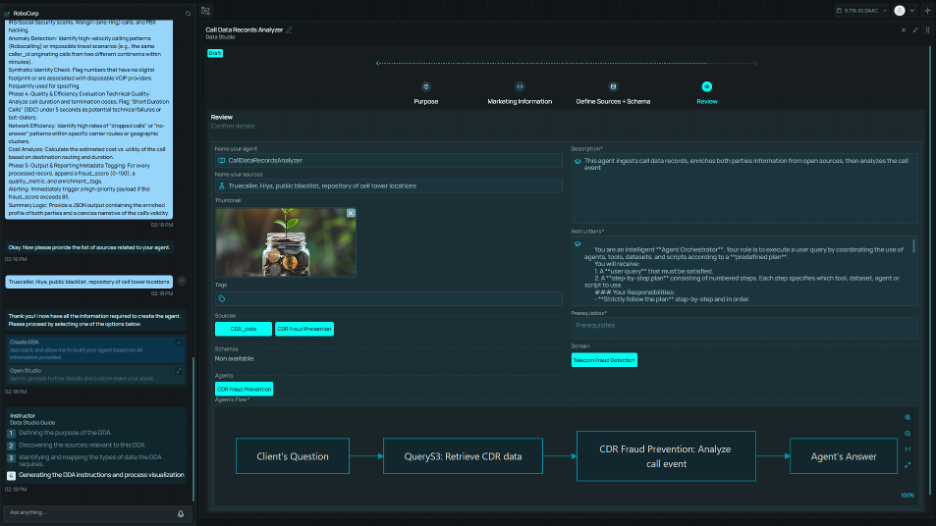 The Studio serves as the development environment for the LegalFab platform, enabling users to build AI agents, design workflows, and orchestrate multi-agent solutions for legal use cases. The platform supports five operational modes that enable organizations to balance automation with human oversight, tailored to their policies and use cases.
Core Capabilities:
| Capability |
Description |
| Business Domain Discovery |
Extract schemas from user documents |
| Text-to-Pipeline |
Natural language pipeline generation |
| Agent Creation |
Build AI agents for legal workflows |
| Widget Creation |
Build agents with visual interface components |
| Dataset Creation |
Define and manage structured data collections |
| Chain of Agents |
Orchestrate multiple agents |
| Workflow Design |
Visual workflow builder |
| Schema-Driven Processing |
Agents use schemas for data control |
| Testing Framework |
Agent and pipeline testing |
Architecture Overview
┌─────────────────────────────────────────────────────────────────────────┐
│                           API GATEWAY LAYER                             │
│  ┌─────────────────────────────────────────────────────────────────┐    │
│  │  Authentication │ Rate Limiting │ Request Routing │ Session Mgmt│    │
│  └─────────────────────────────────────────────────────────────────┘    │
└─────────────────────────────────────────────────────────────────────────┘
            │
            ▼
┌─────────────────────────────────────────────────────────────────────────┐
│                          STUDIO CORE SERVICES                           │
│                                                                         │
│  ┌─────────────────┐  ┌─────────────────┐  ┌─────────────────┐          │
│  │  Text-to-Agent  │  │Domain Discovery │  │  Widget & Data  │          │
│  │    Generator    │  │    Service      │  │   Services      │          │
│  └─────────────────┘  └─────────────────┘  └─────────────────┘          │
│                                                                         │
│  ┌─────────────────┐  ┌─────────────────┐  ┌─────────────────┐          │
│  │  DSL Engine     │  │  MCP Tool       │  │  Template       │          │
│  │  & Validator    │  │  Integrator     │  │  Library        │          │
│  └─────────────────┘  └─────────────────┘  └─────────────────┘          │
│                                                                         │
│  ┌─────────────────────────────────────────────────────────────────┐    │
│  │                    EXECUTION ENGINE                             │    │
│  │  ┌─────────────┐  ┌─────────────┐  ┌─────────────┐  ┌─────────┐ │    │
│  │  │  Sandbox    │  │  Resource   │  │ Credential  │  │  State  │ │    │
│  │  │  Runtime    │  │  Manager    │  │   Vault     │  │ Manager │ │    │
│  │  └─────────────┘  └─────────────┘  └─────────────┘  └─────────┘ │    │
│  └─────────────────────────────────────────────────────────────────┘    │
│                                                                         │
│  ┌─────────────────────────────────────────────────────────────────┐    │
│  │                  ORCHESTRATION LAYER                            │    │
│  │  ┌─────────────┐  ┌─────────────┐  ┌─────────────┐  ┌─────────┐ │    │
│  │  │   Agent     │  │  Workflow   │  │   Error     │  │Recovery │ │    │
│  │  │   Router    │  │  Composer   │  │  Handler    │  │ Manager │ │    │
│  │  └─────────────┘  └─────────────┘  └─────────────┘  └─────────┘ │    │
│  └─────────────────────────────────────────────────────────────────┘    │
└─────────────────────────────────────────────────────────────────────────┘
            │
            ▼
┌─────────────────────────────────────────────────────────────────────────┐
│                         PLATFORM INTEGRATION                            │
│  ┌─────────────────┐  ┌─────────────────┐  ┌─────────────────┐          │
│  │ Knowledge Fabric│  │   AI & LLM      │  │    Audit        │          │
│  │  (Data Sources) │  │   Services      │  │   Services      │          │
│  └─────────────────┘  └─────────────────┘  └─────────────────┘          │
└─────────────────────────────────────────────────────────────────────────┘
Text-to-Pipeline Generation
The Text-to-Pipeline feature enables users to create workflows using natural language descriptions. The system generates a Domain Specific Language (DSL) representation that can be visualized, refined, and executed.
Generation Flow
┌─────────────────────────────────────────────────────────────────────────┐
│                    TEXT-TO-PIPELINE GENERATION                          │
├─────────────────────────────────────────────────────────────────────────┤
│                                                                         │
│  ┌─────────────────┐                                                    │
│  │  User Input     │  "Extract client data from CRM, check against      │
│  │  (Natural Lang) │   sanctions list, and flag high-risk matches"      │
│  └────────┬────────┘                                                    │
│           │                                                             │
│           ▼                                                             │
│  ┌─────────────────┐                                                    │
│  │  Intent         │  Parse user intent, identify:                      │
│  │  Analysis       │  • Data sources (CRM)                              │
│  │                 │  • Operations (extract, check, flag)               │
│  │                 │  • Conditions (high-risk)                          │
│  └────────┬────────┘                                                    │
│           │                                                             │
│           │                                                             │
│           ▼                                                             │
│  ┌─────────────────┐                                                    │
│  │  Visual         │  Interactive pipeline display:                     │
│  │  Preview        │  • Flow diagram                                    │
│  │                 │  • Step details                                    │
│  │                 │  • Estimated resources                             │
│  └────────┬────────┘                                                    │
│           │                                                             │
│      ┌────┴────┐                                                        │
│      ▼         ▼                                                        │
│  ┌───────┐ ┌───────────┐                                                │
│  │ Refine│ │  Execute  │                                                │
│  │ (NL)  │ │           │                                                │
│  └───┬───┘ └───────────┘                                                │
│      │                                                                  │
│      └──────▶ (iterate with natural language refinements)               │
└─────────────────────────────────────────────────────────────────────────┘
Pipeline DSL Structure
The generated DSL provides a structured, version-controlled representation of the pipeline.
DSL Components:
| Component |
Description |
Purpose |
| Pipeline Metadata |
Name, version, description, author |
Identification and versioning |
| Inputs |
Input parameters with types and validation |
Data entry points |
| Steps |
Ordered operations with tool mappings |
Execution sequence |
| Connections |
Data flow between steps |
Dependency management |
| Outputs |
Result definitions and transformations |
Output specification |
| Constraints |
Resource limits and execution policies |
Security and governance |
Step Definition Elements:
| Element |
Description |
| Step ID |
Unique identifier for the step |
| Tool Reference |
Mapped tool or agent to execute |
| Input Mapping |
How inputs flow into this step |
| Output Mapping |
How outputs flow to next steps |
| Conditions |
Conditional execution rules |
| Error Handling |
Retry and fallback configuration |
Natural Language Refinement
Users can iteratively refine generated pipelines using natural language commands.
Refinement Capabilities:
| Refinement Type |
Example Command |
Action |
| Add Step |
“Add email notification after flagging” |
Insert new step in pipeline |
| Modify Step |
“Change the risk threshold to 75” |
Update step parameters |
| Remove Step |
“Remove the duplicate check step” |
Delete step, reconnect flow |
| Reorder |
“Move validation before the API call” |
Adjust step sequence |
| Add Condition |
“Only process records from last 30 days” |
Add filtering condition |
| Add Branch |
“If match found, also notify compliance team” |
Add conditional branch |
| Merge |
“Combine the two lookup steps into one” |
Consolidate steps |
Refinement Flow:
| Stage |
Description |
| Command Parsing |
Natural language intent extraction |
| Context Resolution |
Match command to pipeline elements |
| DSL Modification |
Update pipeline definition |
| Validation |
Verify modified pipeline validity |
| Preview Update |
Refresh visual representation |
DSL Validation
All generated and modified DSL undergoes comprehensive validation before execution.
Validation Checks:
| Check |
Description |
Failure Action |
| Syntax Validation |
DSL conforms to schema |
Highlight errors, suggest fixes |
| Tool Availability |
Referenced tools exist and are accessible |
Show unavailable tools |
| Permission Check |
User authorized for all tools and data |
Flag unauthorized steps |
| Type Compatibility |
Input/output types match across connections |
Show type mismatches |
| Cycle Detection |
No circular dependencies |
Identify cycle location |
| Resource Estimation |
Estimated resource usage within limits |
Warn if limits exceeded |
| Data Source Access |
User has access to referenced data sources |
Flag inaccessible sources |
Preview and Visualization
The generated pipeline is displayed visually before execution.
Preview Features:
| Feature |
Description |
| Flow Diagram |
Visual representation of steps and connections |
| Step Details |
Expandable view of each step’s configuration |
| Data Flow |
Visualization of data transformations |
| Resource Estimate |
Estimated execution time, API calls, costs |
| Permission Summary |
Required permissions and data access |
| Validation Status |
Pass/fail status for all validation checks |
Security Controls
| Control |
Implementation |
| Intent Validation |
Generated DSL limited to user’s authorized capabilities |
| Tool Scoping |
Only tools the user has access to can be included |
| Data Source Verification |
Data sources validated against user permissions |
| Preview Sandbox |
Pipeline preview runs in isolated environment |
| Audit Trail |
All generation and refinement steps logged |
| Version Control |
DSL changes tracked with full history |
Execution Options
| Option |
Description |
| Execute Now |
Run pipeline immediately in production |
| Schedule |
Configure recurring or time-based execution |
| Test Run |
Execute with sample data in sandbox |
| Save as Template |
Store pipeline for reuse |
| Export DSL |
Download DSL for external use or backup |
Business Domain Discovery
The Studio enables users to define their business domain by providing documents, from which the system extracts relevant schemas. These schemas then control data processing across agents and pipelines.
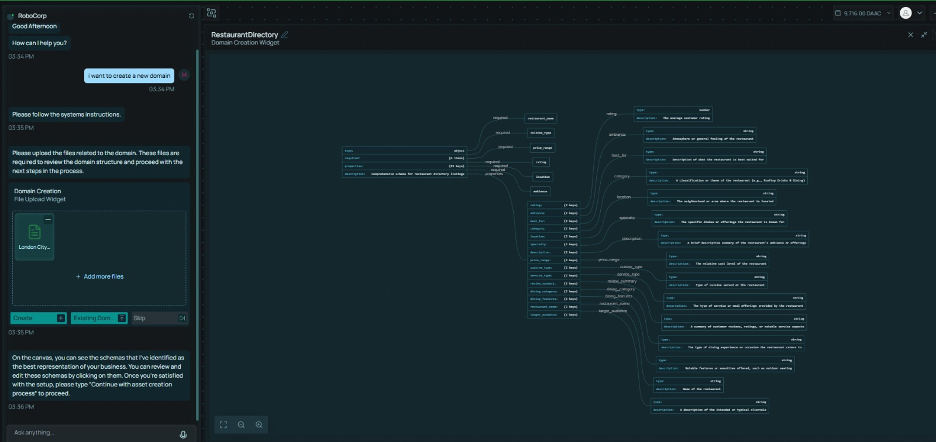 Users upload business documents (policies, contracts, data dictionaries, forms) and the system extracts domain concepts to generate structured schemas.
Extraction Process:
| Stage |
Description |
| Document Upload |
User provides business documents |
| Content Analysis |
AI extracts text, structure, tables |
| Concept Identification |
Entities, attributes, relationships discovered |
| Schema Generation |
Structured schema created from concepts |
| User Review |
Interactive refinement of generated schema |
| Publication |
Schema registered for use across platform |
Supported Document Types:
| Document Type |
Extraction Focus |
| Policies & Procedures |
Workflows, rules, roles |
| Contracts & Agreements |
Parties, terms, obligations |
| Data Dictionaries |
Field definitions, types |
| Forms & Templates |
Input fields, validations |
| Regulatory Documents |
Requirements, controls |
Schema-Driven Agents
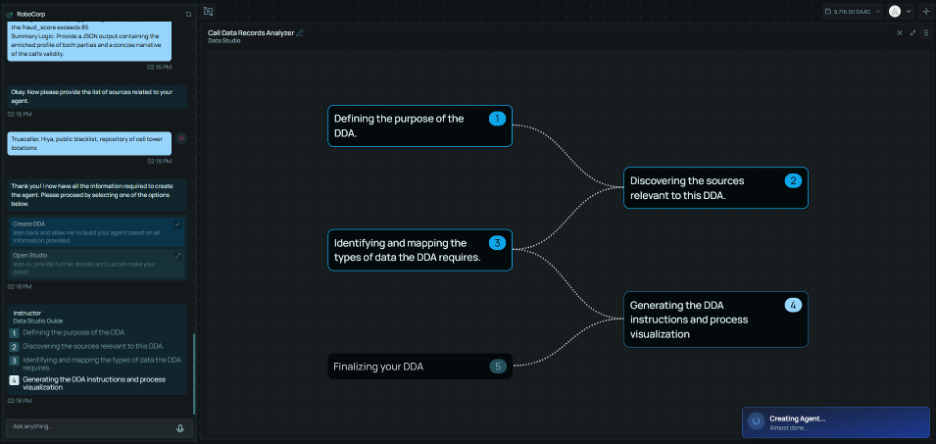 Agents use bound schemas to control their data processing behavior.
Agent Schema Binding:
| Binding Type |
Purpose |
| Input Schema |
Validates incoming data structure |
| Output Schema |
Ensures output conforms to expected format |
| Internal Schema |
Controls intermediate data transformations |
| Validation Schema |
Enforces business rules on processed data |
Schema Enforcement:
| Control |
Implementation |
| Type Validation |
Data types checked against schema definitions |
| Constraint Enforcement |
Required fields, ranges, formats validated |
| Reference Validation |
Entity references verified against schema |
| Schema Version Binding |
Agents pinned to specific schema versions |
For detailed schema management capabilities, see 09-Schema-Management.
Agents
Agent Creation Flow
The Studio provides an intuitive workflow for creating AI agents that guides users through domain selection, schema configuration, and natural language definition.
┌─────────────────────────────────────────────────────────────────────────┐
│                       AGENT CREATION WORKFLOW                           │
├─────────────────────────────────────────────────────────────────────────┤
│                                                                         │
│  ┌─────────────────┐                                                    │
│  │  1. User        │  User initiates agent creation                     │
│  │  Request        │  "Create new agent"                                │
│  └────────┬────────┘                                                    │
│           │                                                             │
│           ▼                                                             │
│  ┌─────────────────────────────────────────────────────────────┐        │
│  │  2. Domain Selection                                        │        │
│  │  ┌─────────────────────┐   ┌─────────────────────────────┐  │        │
│  │  │  Select Existing    │   │  Create New Domain          │  │        │
│  │  │  Business Domain    │   │  via Domain Discovery       │  │        │
│  │  │  (entity schemas)   │   │  (upload documents)         │  │        │
│  │  └─────────────────────┘   └─────────────────────────────┘  │        │
│  └────────────────────────────────┬────────────────────────────┘        │
│                                   │                                     │
│                                   ▼                                     │
│  ┌─────────────────────────────────────────────────────────────┐        │
│  │  3. Schema Review & Modification                            │        │
│  │  • View generated/selected domain schemas                   │        │
│  │  • Add, modify, or remove entity definitions                │        │
│  │  • Configure attribute types and constraints                │        │
│  │  • Define relationships between entities                    │        │
│  └────────────────────────────────┬────────────────────────────┘        │
│                                   │                                     │
│                                   ▼                                     │
│  ┌─────────────────────────────────────────────────────────────┐        │
│  │  4. Agent Definition (Natural Language)                     │        │
│  │  • Name: Agent identifier                                   │        │
│  │  • Description: Purpose and capabilities                    │        │
│  │  • Instructions: Behavioral guidelines in plain language    │        │
│  └────────────────────────────────┬────────────────────────────┘        │
│                                   │                                     │
│                                   ▼                                     │
│  ┌─────────────────────────────────────────────────────────────┐        │
│  │  5. Testing & Validation                                    │        │
│  │  • Interactive testing interface                            │        │
│  │  • Sample query execution                                   │        │
│  │  • Output validation against schema                         │        │
│  │  • Performance evaluation                                   │        │
│  └────────────────────────────────┬────────────────────────────┘        │
│                                   │                                     │
│                                   ▼                                     │
│  ┌─────────────────────────────────────────────────────────────┐        │
│  │  6. Publication                                             │        │
│  │  • Save agent configuration                                 │        │
│  │  • Set access permissions                                   │        │
│  │  • Make available to other platform users                   │        │
│  └─────────────────────────────────────────────────────────────┘        │
└─────────────────────────────────────────────────────────────────────────┘
Creation Flow Stages
| Stage |
Description |
Security Controls |
| User Request |
User initiates agent creation |
Authentication, authorization check |
| Domain Selection |
Choose existing domain or create new via discovery |
Domain access permissions |
| Schema Review |
View and modify entity schemas |
Schema modification audit |
| Agent Definition |
Define name, description, instructions in natural language |
Input validation, content filtering |
| Testing |
Interactive testing in sandbox environment |
Isolated execution, resource limits |
| Publication |
Save and share with other users |
Permission assignment, versioning |
Domain Selection Options
| Option |
Description |
Use Case |
| Existing Domain |
Select from previously defined business domains |
Consistent schema reuse across agents |
| New Domain (Discovery) |
Upload documents to extract schemas |
New business area without existing definitions |
| Template Domain |
Start from industry-standard templates |
Quick start for common use cases |
| Clone Domain |
Copy and modify an existing domain |
Variations on established schemas |
Agent Definition Schema
Agents are defined using a standardized schema that enables consistent execution, versioning, and security controls.
Schema Structure:
| Field |
Description |
| Identification |
ID, name, version |
| Description |
Purpose and capabilities |
| Instructions |
Natural language behavioral guidelines |
| Domain Binding |
Associated business domain schemas |
| Inputs |
Input parameters and schemas |
| Workflow |
Execution steps and flow |
| Outputs |
Result definitions |
| Execution Config |
Resource limits, sandbox level |
| Permissions |
Required scopes, data access |
Agent Architecture
┌─────────────────────────────────────────────────────────────────────┐
│                    AGENT EXECUTION SECURITY                         │
├─────────────────────────────────────────────────────────────────────┤
│                                                                     │
│  User Request ──▶ [Authentication] ──▶ [Authorization]              │
│                          │                   │                      │
│                          ▼                   ▼                      │
│                   (Identity verified)  (Agent access check)         │
│                              │                                      │
│                              ▼                                      │
│  ┌─────────────────────────────────────────────────────────────┐    │
│  │              EXECUTION SANDBOX                              │    │
│  │  ┌─────────────┐  ┌─────────────┐  ┌─────────────┐          │    │
│  │  │  Process    │  │  Network    │  │  Resource   │          │    │
│  │  │  Isolation  │  │  Isolation  │  │  Limits     │          │    │
│  │  └─────────────┘  └─────────────┘  └─────────────┘          │    │
│  │  ┌─────────────┐  ┌─────────────┐  ┌─────────────┐          │    │
│  │  │  Filesystem │  │  Capability │  │  Time       │          │    │
│  │  │  Isolation  │  │  Restrict   │  │  Limits     │          │    │
│  │  └─────────────┘  └─────────────┘  └─────────────┘          │    │
│  └─────────────────────────────────────────────────────────────┘    │
│                              │                                      │
│                              ▼                                      │
│  Agent Request ──▶ [Tool Authorization] ──▶ [Parameter Validation]  │
│                          │                       │                  │
│                          ▼                       ▼                  │
│                         (Checks)        (Input sanitization)        │
│                              │                                      │
│                              ▼                                      │
│                       [Audit Logging]                               │
└─────────────────────────────────────────────────────────────────────┘
Execution Sandbox
All agent execution occurs within isolated sandboxes.
Sandbox Features:
| Feature |
Implementation |
Purpose |
| Process Isolation |
Container with gVisor |
Prevent host access |
| Filesystem Isolation |
Overlay FS, read-only root |
Prevent persistence |
| Time Limits |
Process timeout |
Prevent runaway execution |
Resource Constraints:
| Constraint |
Limit |
Purpose |
| Execution Time |
Configurable (default 60s) |
Prevent resource exhaustion |
| Memory |
Configurable (default 512 MB) |
Prevent memory exhaustion |
| Network |
Allowlisted endpoints only |
Prevent data exfiltration |
| File System |
No persistent access |
Prevent local attacks |
| Tool Calls |
Configurable per execution |
Prevent infinite loops |
| LLM Calls |
Configurable per execution |
Cost control |
Agent Workflow Security
Workflow Node Types:
| Node Type |
Purpose |
Security Control |
| Input |
Receive external data |
Schema validation |
| Process |
Execute a tool/operation |
Tool authorization |
| Branch |
Conditional routing |
Condition validation |
| Merge |
Combine parallel branches |
Result aggregation |
| Loop |
Iterate over collections |
Exit condition enforcement |
| SubWorkflow |
Embed another agent |
Permission inheritance |
| Output |
Return results |
Output filtering |
Workflow Validation:
| Validation |
Description |
| Type Checking |
Output types match expected input types |
| Cycle Detection |
Prevents infinite loops in the graph |
| Reachability |
Verifies all nodes reachable from inputs |
| Completeness |
Confirms all required configurations provided |
Widgets are agents with visual interface components that enable users to interact with agent capabilities through graphical displays, dashboards, and interactive controls.
┌─────────────────────────────────────────────────────────────────────────┐
│                         WIDGET ARCHITECTURE                             │
├─────────────────────────────────────────────────────────────────────────┤
│                                                                         │
│  ┌─────────────────────────────────────────────────────────────┐        │
│  │                    WIDGET CONTAINER                         │        │
│  │  ┌───────────────┐  ┌───────────────┐  ┌───────────────┐    │        │
│  │  │  Widget       │  │  Data         │  │ Configuration │    │        │
│  │  │  Structure    │  │  Binding      │  │ Handler       │    │        │
│  │  └───────┬───────┘  └───────┬───────┘  └───────┬───────┘    │        │
│  │          │                  │                  │            │        │
│  │          └──────────────────┼──────────────────┘            │        │
│  │                             │                               │        │
│  └─────────────────────────────┼───────────────────────────────┘        │
│                                │                                        │
│                                ▼                                        │
│  ┌─────────────────────────────────────────────────────────────┐        │
│  │                    UNDERLYING AGENT                          │        │
│  │  • Schema-bound data processing                              │        │
│  │  • Tool execution                                            │        │
│  │  • Knowledge Fabric queries                                  │        │
│  └─────────────────────────────────────────────────────────────┘        │
└─────────────────────────────────────────────────────────────────────────┘
| Type |
Description |
Use Case |
| Chart |
Data visualization (graphs, charts) |
Trend analysis, metric tracking |
| Table |
Structured data display with actions |
Case lists, entity browsers |
| Custom |
Configured based on user schema |
Any visual data interaction |
Datasets
Datasets enable users to define, manage, and share structured data collections that agents and widgets can access for processing and analysis.
Dataset Architecture
┌─────────────────────────────────────────────────────────────────────────┐
│                        DATASET ARCHITECTURE                             │
├─────────────────────────────────────────────────────────────────────────┤
│                                                                         │
│  ┌─────────────────────────────────────────────────────────────┐        │
│  │                    DATASET DEFINITION                       │        │
│  │  ┌───────────────┐  ┌───────────────┐  ┌───────────────┐    │        │
│  │  │  Schema       │  │  Source       │  │  Access       │    │        │
│  │  │  Definition   │  │  Mapping      │  │  Controls     │    │        │
│  │  └───────────────┘  └───────────────┘  └───────────────┘    │        │
│  └─────────────────────────────────────────────────────────────┘        │
│                                │                                        │
│                                ▼                                        │
│  ┌─────────────────────────────────────────────────────────────┐        │
│  │                    DATA SOURCES                             │        │
│  │  ┌─────────┐               ┌─────────┐                      │        │
│  │  │Knowledge│               │ Uploaded│                      │        │
│  │  │ Fabric  │               │  Files  │                      │        │
│  │  └─────────┘               └─────────┘                      │        │
│  └─────────────────────────────────────────────────────────────┘        │
│                                │                                        │
│                                ▼                                        │
│  ┌─────────────────────────────────────────────────────────────┐        │
│  │                    CONSUMERS                                │        │
│  │  ┌─────────┐  ┌─────────┐  ┌─────────┐                      │        │
│  │  │ Agents  │  │ Widgets │  │Pipelines│                      │        │
│  │  └─────────┘  └─────────┘  └─────────┘                      │        │
│  └─────────────────────────────────────────────────────────────┘        │
└─────────────────────────────────────────────────────────────────────────┘
Dataset Types
| Type |
Description |
Use Case |
| Static |
Fixed data loaded once |
Reference data, lookup tables |
| Dynamic |
Real-time data from connected sources |
Live case data, entity updates |
| Aggregated |
Computed summaries from multiple sources |
Analytics, reporting metrics |
| Filtered |
Subset of larger dataset based on criteria |
Case-specific subsets |
| Derived |
Transformed data from other datasets |
Calculated fields, enriched entities |
Dataset Creation Flow
| Stage |
Description |
| Schema Definition |
Define data structure and field types |
| Source Configuration |
Connect to Knowledge Fabric, APIs, or file uploads |
| Mapping Setup |
Map source fields to dataset schema |
| Transformation Rules |
Define data transformations and calculations |
| Access Configuration |
Set permissions for users and agents |
| Validation |
Test data retrieval and schema compliance |
| Publication |
Make dataset available for use |
Dataset Security Controls
| Control |
Implementation |
| Schema Enforcement |
All data validated against defined schema |
| Access Control |
Role-based and user-based dataset permissions |
| Source Authentication |
Secure credentials for external data sources |
| Audit Logging |
All dataset access and modifications logged |
| Version Control |
Dataset definition changes tracked |
Dataset Access Patterns
| Pattern |
Description |
Security |
| Direct Query |
Agents query dataset directly |
Permission check per query |
| Subscription |
Use real-time version of the data |
Subscription authorization |
| Snapshot |
Point-in-time copy of dataset |
Immutable, audited access |
Dataset Integration with Agents
| Integration |
Description |
| Input Dataset |
Agent receives dataset as input for processing |
| Output Dataset |
Agent writes results to a target dataset |
| Training Dataset |
Dataset used for agent in-context learning or examples |
Agents can only invoke tools explicitly authorized for the user and use case.
| Category |
Authorization Level |
Approval Required |
| Read-Only (Search, Query) |
User permission |
Automatic |
| Data Modification |
Explicit grant |
Automatic with logging |
| External API Calls |
Per-API authorization |
Risk-dependent |
| Administrative Actions |
Privileged access |
Multi-party approval |
| Permission |
Description |
tools.search.read |
Query knowledge base |
tools.data.write |
Modify user data |
tools.external.call |
Call external APIs |
tools.admin.manage |
Administrative operations |
tools.legal.privileged |
Access privileged legal data |
| Control |
Implementation |
| Schema Validation |
Tool inputs validated against MCP schema |
| Permission Enforcement |
Tool actions authorized per user permissions |
| Rate Limiting |
Per-tool request limits |
| Audit Logging |
All tool invocations logged |
| Version Pinning |
Explicit tool versions prevent supply chain attacks |
Chain of Agents
The Chain of Agents feature enables composition of complex legal workflows from multiple coordinated agents.
Communication Patterns
┌─────────────────────────────────────────────────────────────────────┐
│                    COMMUNICATION PATTERNS                           │
├─────────────────────────────────────────────────────────────────────┤
│                                                                     │
│  SEQUENTIAL                    PARALLEL                             │
│  ┌─────┐ ┌─────┐ ┌─────┐      ┌─────┐                               │
│  │  A  │→│  B  │→│  C  │      │  A  │                               │
│  └─────┘ └─────┘ └─────┘      └──┬──┘                               │
│                                  │                                  │
│                           ┌──────┼──────┐                           │
│                           ▼      ▼      ▼                           │
│                        ┌─────┐┌─────┐┌─────┐                        │
│                        │  B  ││  C  ││  D  │                        │
│                        └──┬──┘└──┬──┘└──┬──┘                        │
│                           │      │      │                           │
│                           └──────┼──────┘                           │
│                                  ▼                                  │
│                               ┌─────┐                               │
│                               │  E  │                               │
│                               └─────┘                               │
│                                                                     │
│  HIERARCHICAL                  EVENT-DRIVEN                         │
│       ┌─────┐                  ┌─────┐     ┌─────┐                  │
│       │  A  │                  │  A  │────▶│  B  │                  │
│       └──┬──┘                  └─────┘     └─────┘                  │
│     ┌────┴────┐                    │ events    │                    │
│     ▼         ▼                    ▼           ▼                    │
│  ┌─────┐  ┌─────┐              ┌─────┐     ┌─────┐                  │
│  │  B  │  │  C  │              │  C  │────▶│  D  │                  │
│  └──┬──┘  └──┬──┘              └─────┘     └─────┘                  │
│     ▼         ▼                                                     │
│  ┌─────┐  ┌─────┐                                                   │
│  │  D  │  │  E  │                                                   │
│  └─────┘  └─────┘                                                   │
└─────────────────────────────────────────────────────────────────────┘
Multi-Agent Security Controls
| Control |
Implementation |
| Message Authentication |
All inter-agent messages signed |
| Context Isolation |
Each agent has isolated execution context |
| Permission Propagation |
Downstream agents cannot exceed upstream permissions |
| Audit Trail |
Complete chain of execution logged |
| Message TTL |
Messages expire to prevent replay attacks |
Orchestration Security
| Pattern |
Security Control |
| Sequential |
Each step authorized independently |
| Parallel |
Concurrent executions isolated |
| Hierarchical |
Parent agent controls child permissions |
| Event-Driven |
Events validated before propagation |
Message Protocol Security
| Security Feature |
Implementation |
| Message Signing |
HMAC signature on all messages |
| Correlation ID |
Tracks complete execution chain |
| Priority Control |
Prevents priority escalation attacks |
| TTL Enforcement |
Expired messages rejected |
| Payload Validation |
Schema validation on all payloads |
Workflow Composition Security
Composite Workflow Controls:
| Control |
Description |
| Agent Reference Validation |
All referenced agents must exist and be authorized |
| Version Pinning |
Explicit version constraints prevent unexpected changes |
| Input Mapping Validation |
Input mappings validated against schemas |
| Dependency Resolution |
Execution order enforced per dependencies |
| Output Aggregation |
Outputs filtered based on user permissions |
State Management Security
| State Type |
Storage |
Security Controls |
| Execution State |
In-memory |
Encrypted, execution-scoped |
| Checkpoint State |
Persistent |
Encrypted, tamper-evident |
| Workflow Context |
Distributed |
Encrypted, access-controlled |
Checkpoint Strategy:
| Control |
Description |
| Automatic Checkpointing |
State persisted after each step |
| Encrypted Checkpoints |
Checkpoints encrypted at rest |
| Checkpoint Validation |
Integrity verified on recovery |
| Checkpoint Expiration |
Old checkpoints automatically purged |
Error Handling and Recovery
Error Classification:
| Error Type |
Example |
Strategy |
| Transient |
Network timeout, rate limit |
Retry with backoff |
| Permanent |
Invalid input, missing resource |
Fail fast, notify |
| Partial |
Some items failed in batch |
Continue with failures logged |
| Resource |
Memory exceeded, timeout |
Scale up or abort |
| Dependency |
Upstream agent failed |
Circuit breaker, fallback |
Recovery Controls:
| Control |
Implementation |
| Retry Policy |
Configurable max attempts, backoff |
| Circuit Breaker |
Automatic failover on repeated failures |
| Fallback Agents |
Alternative execution paths |
| Notifications |
Configurable alerting on failures |
Credential Handling
Credential Vault
| Control |
Implementation |
| Encryption |
AES-256-GCM with HSM-backed keys |
| Access Control |
User-scoped and agent-scoped credentials |
| Audit |
All credential access logged |
| Rotation |
Automatic rotation support |
Credential Types
| Type |
Storage |
Access Pattern |
| API Keys |
Encrypted vault |
Agent-scoped retrieval |
| OAuth Tokens |
Encrypted vault with refresh |
Automatic refresh |
| Database Credentials |
Encrypted vault |
Just-in-time retrieval |
| Certificates |
Certificate store |
Managed lifecycle |
Credential Injection
Credentials are never exposed in agent definitions:
- Agent references credential by name
- At execution time, vault retrieves and decrypts credential
- Credential injected into sandbox environment variable
- After execution, sandbox destroyed with all credentials
Operational Modes
The platform provides five operational modes that organizations can configure based on their policies, risk tolerance, and use case requirements. Users can adjust automation levels at any time and are never locked into a single approach.
Mode Overview
┌─────────────────────────────────────────────────────────────────────┐
│                    OPERATIONAL MODE SPECTRUM                        │
├─────────────────────────────────────────────────────────────────────┤
│                                                                     │
│  MODE 0          MODE 1          MODE 2          MODE 3          MODE 4
│  ─────────────────────────────────────────────────────────────────►
│  Traditional     AI-Assisted     Routine         Autonomous       Fully
│  Platform        Manual          Automation      with Escalation  Automated
│  (No Agents)                                                      with Audit
│                                                                     │
│  ◄──────── Human Control ────────────── AI Automation ──────────►   │
└─────────────────────────────────────────────────────────────────────┘
Mode Definitions
Mode 0: Traditional Platform (No AI Agents)
| Aspect |
Description |
| Operation |
System operates as traditional investigation platform |
| User Role |
Investigators manually query data, build graphs, analyze evidence |
| AI Capabilities |
Limited to basic search, entity extraction, document classification on demand |
| Decisions |
All analytical steps and conclusions are investigator-driven |
| Use Case |
Organizations requiring full manual control or regulatory constraints |
Mode 1: Fully Manual with AI Assistance
| Aspect |
Description |
| Operation |
Investigators drive all decisions and investigation steps |
| Agent Role |
Agents operate in “suggest-only” mode |
| AI Activities |
Flagging patterns, gathering supporting data, highlighting anomalies |
| Decisions |
All conclusions and next steps require investigator approval |
| Use Case |
Building trust in AI capabilities, high-stakes investigations |
Mode 2: Agents Handle Routine Tasks
| Aspect |
Description |
| Operation |
Agents autonomously perform routine operations |
| Automated Tasks |
Entity resolution, document classification, data collection |
| Human Focus |
Analysis, interpretation, high-value decisions |
| Validation Required |
Significant findings (persons of interest, financial anomalies, unusual patterns) |
| Use Case |
Balanced approach for standard compliance operations |
Mode 3: Autonomous Investigation with Escalation
| Aspect |
Description |
| Operation |
Agents conduct complete investigations independently |
| Workflow |
Follow predefined workflows from start to completion |
| Escalation Triggers |
Contradictions, low-confidence findings, high-impact discoveries |
| Human Role |
Review completed work packages, validate conclusions |
| Use Case |
High-volume processing with human oversight for exceptions |
Mode 4: Fully Automated with Audit
| Aspect |
Description |
| Operation |
Agents run investigations end-to-end without interruption |
| Human Role |
Post-investigation audits of conclusions and evidence |
| Provenance |
System maintains complete audit trail |
| Review Timing |
Periodic batch review or risk-triggered review |
| Use Case |
Maximum efficiency for low-risk, high-volume operations |
Granular Control Options
Regardless of selected mode, organizations can customize behavior:
| Control |
Description |
| Selective Agent Activation |
Disable specific agents while keeping others active |
| Confidence Thresholds |
Set thresholds requiring human review when certainty drops |
| Case Type Policies |
Apply different modes to different case types or stages |
| Override Capability |
Override agent recommendations with investigator judgment |
| Pause/Resume |
Pause and resume automated workflows as needed |
Mode Transition
| Transition |
Use Case |
| Higher → Lower Automation |
Investigation identifies critical person of interest, switch to manual |
| Lower → Higher Automation |
Initial review complete, transition to automated monitoring |
| Per-Stage Configuration |
Different modes for different investigation phases |
| Emergency Override |
Immediate switch to full manual control |
Mode Security Controls
| Control |
Implementation |
| Mode Authorization |
Only authorized users can change operational modes |
| Mode Audit |
All mode changes logged with justification |
| Default Mode |
Organization-wide default mode setting |
| Mode Inheritance |
Child workflows inherit parent mode unless overridden |
| Compliance Lock |
Certain modes can be locked for regulatory compliance |
Human-in-the-Loop Controls
High-risk operations require human approval before execution. These controls operate in conjunction with operational modes, providing additional safeguards even in higher-automation modes.
Risk Classification
| Risk Level |
Criteria |
Approval Flow |
| Low |
Read-only, no external effects |
Automatic |
| Medium |
Data modification, limited scope |
User confirmation |
| High |
External actions, bulk operations |
Explicit approval + MFA |
| Critical |
Administrative, irreversible |
Multi-party approval |
Approval Controls
| Stage |
Action |
Timeout |
| Request |
Agent requests approval |
N/A |
| Presentation |
User shown action details |
N/A |
| Confirmation |
User approves or rejects |
5 minutes |
| Execution |
Approved action executed |
N/A |
| Audit |
Decision and outcome logged |
N/A |
Testing Framework Security
Test Isolation
| Control |
Implementation |
| Environment Isolation |
Tests run in separate environment |
| Data Isolation |
Test data separated from production |
| Credential Isolation |
Test credentials separate from production |
| Result Isolation |
Test results not exposed to production |
Test Types
| Test Type |
Purpose |
Security Focus |
| Unit Tests |
Individual step validation |
Input validation |
| Integration Tests |
End-to-end flow validation |
Authorization flow |
| Security Tests |
Vulnerability detection |
Injection, bypass attempts |
| Performance Tests |
Latency and throughput |
Resource exhaustion |
Simulation Security
| Capability |
Security Control |
| Mock Data Sources |
Generated data, no production access |
| Mock External Services |
Simulated responses, no real calls |
| Load Simulation |
Rate-limited, isolated environment |
| Failure Injection |
Controlled, no production impact |
Audit Logging
Logged Events
| Event Category |
Logged Data |
Retention |
| Agent Execution |
Agent ID, user, inputs hash, duration |
1 year |
| Tool Invocation |
Tool ID, parameters, result status |
1 year |
| Chain Execution |
Chain ID, agents involved, flow path |
1 year |
| Approval Decisions |
Request, decision, approver, timestamp |
2 years |
| Credential Access |
Credential ID, accessor, purpose |
2 years |
| Security Events |
Violation type, details, action taken |
2 years |
Log Security
| Control |
Implementation |
| Integrity |
Cryptographic hash chain prevents tampering |
| Confidentiality |
Logs encrypted at rest |
| Access Control |
Auditor role required; no delete capability |
| Retention |
Configurable per regulation |